




Practical answers for the moments that make a first build feel harder than it should.
Reviewed October 8, 2026 · Build Basics · U.S. edition
A stubborn cable, a blank screen, or memory running below its box speed can interrupt an otherwise straightforward build. Start with the specific symptom, check the exact part's manual, and change one thing at a time. These answers cover modern desktop gaming PCs, with AM5 and DDR5 examples where useful.
Before reseating a part or changing an internal connection, shut down, switch the power supply off, and unplug its AC cord. Handle boards by their edges and use appropriate electrostatic-discharge precautions. Kingston handling and installation precautions.
Can I reuse the modular cables from my old power supply?
Only if the PSU manufacturer explicitly confirms compatibility with your exact models. A connector fitting into the new PSU does not establish that its pins are wired correctly. Even two supplies from the same brand can use different cable families. Use the supplied cables or a replacement set approved for that PSU. CORSAIR cable compatibility guidance.
Keep spare modular cables in a bag labeled with their original PSU model. That small habit makes a future upgrade easier to check.
Are CPU and GPU eight-pin power cables interchangeable?
No. A CPU/EPS cable commonly separates into 4+4 pins; a PCIe GPU cable commonly separates into 6+2. Read the cable labels and the component manuals rather than judging by connector size. Modern GPUs may instead require a specified 16-pin connection. Do not force a mismatched plug. CORSAIR RM cable and connection guide.
For a 16-pin GPU, follow that card's seating, clearance, and cable instructions. The RTX 5080 Founders Edition requirements are one model-specific example; another card can require a different arrangement. NVIDIA card requirements.
Do I add thermal paste if the cooler already has it?
Follow the cooler's instructions. If it arrives with paste pre-applied, adding a second layer is unnecessary. If it requires you to apply paste, use the specified pattern and amount for your CPU socket. Remove any protective film the manual identifies before mounting. MSI cooler preparation.
A dry mounting surface on a different cooler is a different procedure. Noctua's NH-D15 G2, for example, includes a socket-specific paste and mounting sequence. Check your own cooler rather than copying a universal “pea-size” rule. Noctua installation manual.
Which slots should I use for two RAM sticks?
Use your board's recommended pair. A2 and B2 are the specified two-stick positions on MSI's MAG B850 TOMAHAWK MAX WIFI; those are the second and fourth slots outward from its CPU. Check the labels and diagram on your exact board before using that example. MSI memory layout.
Buy and use a matched kit. Combining separately purchased sticks—even with similar marketing specifications—can make the intended profile harder to run reliably. ASUS kit and compatibility advice.

Why is my RAM slower than the speed on the box?
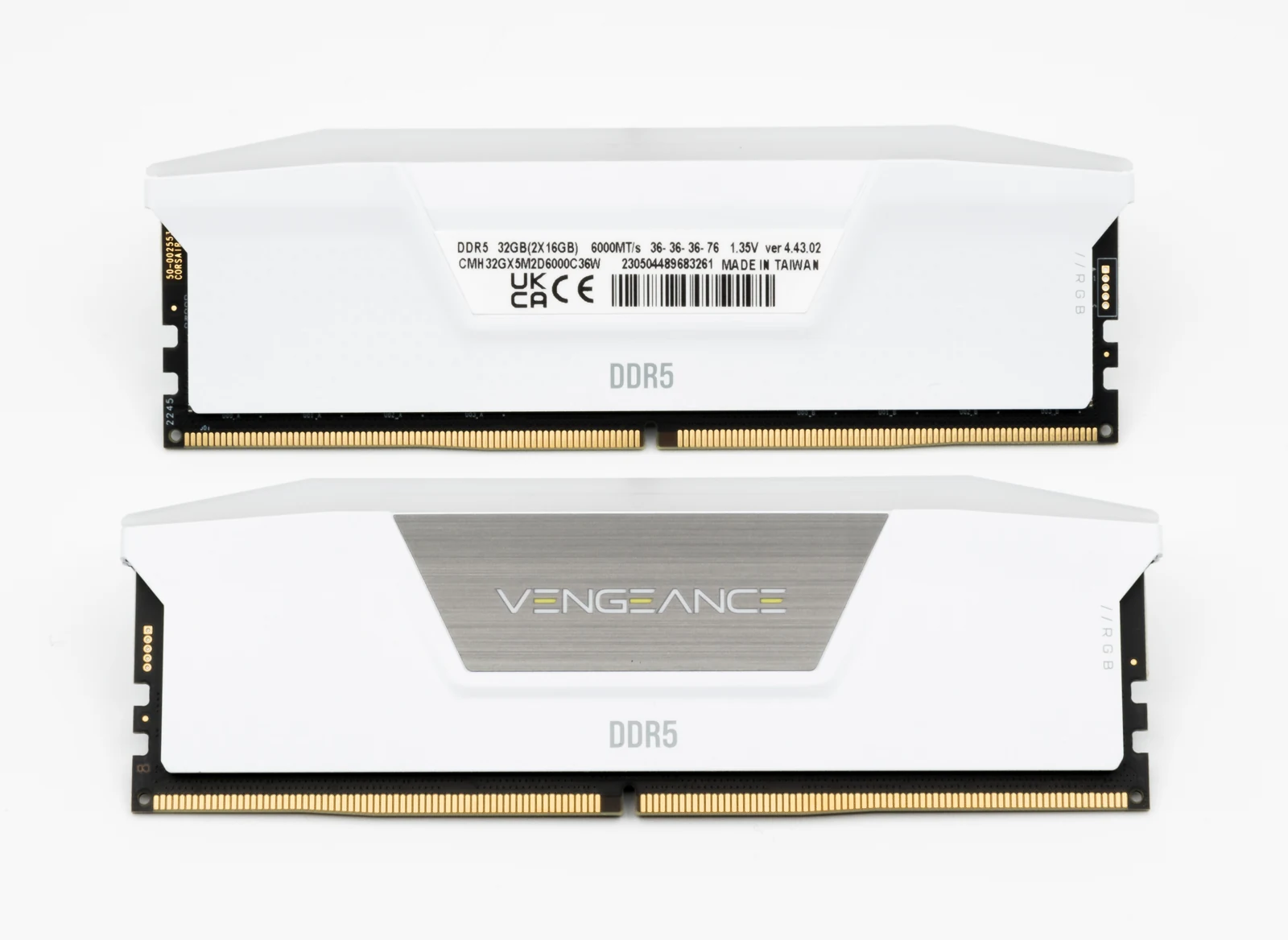
The first boot can use standard JEDEC settings instead of the kit's advertised overclocking profile. That does not automatically mean the kit is defective. Establish a working baseline, then enable the supported XMP or EXPO profile and check the result. MSI's July 2026 explanation.
Our ASUS, MSI, and GIGABYTE memory guide shows the relevant controls and what to do if the profile is unstable. A box rating is not a guarantee that every CPU, motherboard, and module configuration will reach it.
Do I peel the label off an M.2 SSD?
Do not treat every visible layer as packaging. A motherboard heatsink's thermal pad can have a protective film that must come off. The SSD's label or factory heat spreader is a separate item; follow the drive manufacturer's instructions. Kingston's Renegade G5 guidance, for example, places an added heatsink over its existing heat spreader. Kingston support.
Before installing multiple drives, check the motherboard's lane-sharing notes. A slot being physically available does not tell you which other ports or expansion slots its use affects.
Where should I install case standoffs?
Only install standoffs where your motherboard has matching mounting holes. An extra standoff touching the underside of the board can damage it. Confirm the layout before lowering the motherboard, then check for loose screws before powering on. MSI case-standoff precautions.
A case that arrived with an ATX layout may need a different arrangement for a smaller board. Do this check while the case is empty and the mounting points are easy to see.
The fans spin, but the monitor stays black. What first?
Check the monitor's selected input and connect the display cable to the installed graphics card. Motherboard display outputs depend on the CPU's graphics capability and configuration. Also check the GPU's power connections. If you need to reseat anything, disconnect AC power first. ASUS no-display troubleshooting.
A first boot after a memory change can also involve memory training with no picture for a while. Allow the board's documented training process to complete; repeatedly cycling power can interrupt it. If the delay persists beyond the manufacturer's guidance, record the diagnostic light or code and follow the board's troubleshooting steps. ASUS memory-training guidance.
My GPU fans stop at the desktop. Is that a fault?
Some cards deliberately stop their fans at low temperatures. MSI's RTX 5070 GAMING TRIO OC uses Zero Frozr and resumes fan operation when cooling is needed. Check your card's specifications and temperatures before treating idle fan-stop behavior as a failure. This behavior is model-specific. MSI cooling description.
Fans stopping alongside overheating, shutdowns, or visible damage needs a different diagnosis. Record what happens under the conditions that trigger it rather than relying on an idle photo alone.
Can a three-pin ARGB plug use a four-pin RGB header?
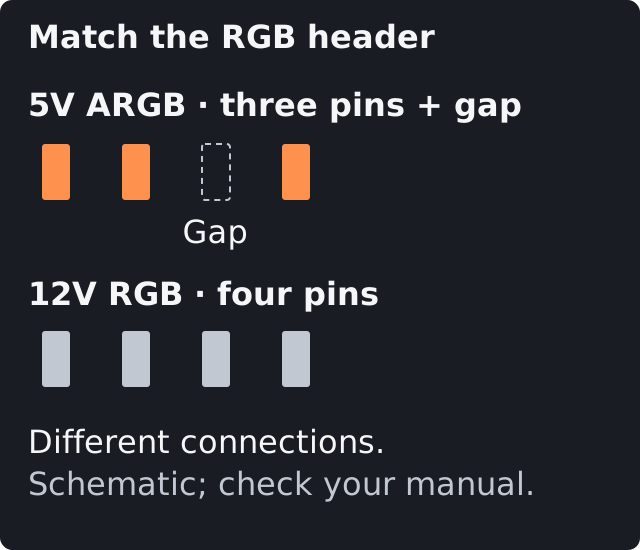
Standard 5V three-pin ARGB and 12V four-pin RGB are different connections. Match the voltage, pin layout, and orientation in the board and lighting-product manuals. Do not force a plug onto the other header; proprietary lighting connectors may also need their own controller. CORSAIR ARGB and RGB explanation.
Should I update the BIOS just because a newer version exists?
Check the board's CPU-support list and release notes first. An update may be required for a new CPU or a documented fix. Follow the exact board's flashing procedure and do not interrupt it. GIGABYTE's current AMD 800-series manual advises against flashing a working system without a reason. GIGABYTE BIOS guidance.
On a PC already using drive encryption, make sure you can retrieve the recovery key before firmware or security-setting changes. Hardware changes can cause a recovery prompt. Microsoft recovery-key guidance.
BIOS sees my new SSD. Why won't it start Windows?
A blank drive has no installed operating system. Recognizing the SSD in BIOS is a hardware checkpoint; it does not put Windows on it. Use a bootable installer, choose the intended drive, and complete setup. Microsoft installation-media guidance.
Continue with Create a Windows 11 USB & Install Your OS, then Install Your GPU Drivers. Keep your first successful baseline documented so later changes are easier to diagnose.