



Build around the games you play, the monitor you use, and the money you actually want to spend.
GRC · Buying Guides · Prices reviewed October 8, 2026 · U.S. market / USD
A good gaming PC starts with a clear goal. Playing on a 1080p monitor, moving up to 1440p, and pushing demanding games at 4K call for different spending priorities. Before you pick a processor or a glass-sided case, decide what you want the PC to do.
These three parts lists give you concrete starting points. Each includes a CPU, motherboard, graphics card, memory, SSD, case, power supply, and CPU cooler. The case includes its fans. You can compare a complete parts basket instead of a tempting CPU-and-GPU price that leaves half the build out.
Price snapshot: We reviewed public U.S. retailer listings on October 8, 2026. Some pages were cached; these are observed listing prices, not live checkout quotes. Totals exclude sales tax, shipping, a Windows license, a monitor, peripherals, and assembly labor. Promo codes, rebates, free games, and bundle discounts are not included in the main totals. Check the exact seller, part number, stock status, and delivered price before ordering.
How we chose: Current independent GPU testing and manufacturer specifications inform the recommendations. GRC has not assembled or benchmarked these three complete systems. Resolution labels describe intended use, not guaranteed frame rates. Your game, settings, ray tracing, and upscaling choices all matter. See Tom’s Hardware’s 2026 GPU testing for its measured results and test methodology.
Choose your starting point
| Build | Parts subtotal | Intended use | Main compromise |
|---|---|---|---|
| Entry | $1,570.84 | 1080p first; selective 1440p | 16GB system RAM and a 1TB SSD |
| Balanced | $2,228.84 | 1440p first; flexible 4K | Keep the six-core CPU; tune demanding settings |
| High-end | $3,327.84 | 4K and demanding graphics settings | A large premium for the GPU and CPU |
“Entry” means the least expensive of these three new AM5 examples. It does not mean the cheapest PC you can build. If your limit is $1,000, do not stretch to this list by dropping the cooler, power supply, or memory from the total. Compare lower-cost platforms, local bundles, refurbished options, and complete prebuilts using the same all-in budget.
Our editorial starting point for a 1440p gaming setup is the Balanced list. Choose Entry if you need to control spending and are comfortable adjusting settings. Choose High-end only when your display and favorite games give you a reason to spend the extra money.
Entry: spend carefully, keep the essentials
About $1,600 · Parts subtotal: $1,570.84
The Ryzen 5 9600X and RX 9060 XT 16GB form the lower-cost starting point. The CPU is a six-core, twelve-thread AM5 part; the graphics card has 16GB of video memory. Keep those two memory numbers separate: the GPU’s 16GB of VRAM does not replace the system’s 16GB of RAM. AMD CPU specifications, graphics card listing.
| Component | Specific part | Observed price |
|---|---|---|
| CPU | AMD Ryzen 5 9600X | $220.00 |
| Motherboard | MSI MAG B850 TOMAHAWK MAX WIFI | $209.99 |
| Graphics card | ASRock Challenger Radeon RX 9060 XT 16GB | $519.99 |
| Memory | TEAMGROUP T-FORCE DELTAα RGB 16GB (2×8GB), DDR5-6000 CL38 | $249.99 |
| SSD | Kingston NV3 1TB, M.2 2280 PCIe 4.0 (SNV3S/1000G) | $156.99 |
| Case | MONTECH AIR 903 MAX, black | $79.99 |
| Power supply | ASRock Steel Legend SL-850G, 850W, ATX 3.1 | $79.99 |
| CPU cooler | Thermalright Phantom Spirit 120 SE | $53.90 |
| Parts subtotal | USD, before tax and shipping | $1,570.84 |
The budget compromise is the 2×8GB memory kit and 1TB SSD. If your games, mods, or background apps need more system memory, price a matched 2×16GB kit before buying. Going from the listed 16GB kit to the listed 32GB kit adds $210.00; moving from the listed 1TB SSD to 2TB adds $138.00. Those are more concrete tradeoffs than buying an expensive motherboard for its appearance.
Use 1080p as the starting target. At 1440p, check benchmarks for your own games and be prepared to adjust settings. The 16GB graphics card was selected for this example deliberately; an 8GB model with a similar name is a different purchase. The resolution recommendation is our interpretation of the current GPU benchmark hierarchy, not an FPS promise.
The $79.99 850W supply is carried across all three lists because of the observed price and connections. We are not claiming this entry build needs 850W. A lower-wattage alternative can make sense if its exact model, protections, connectors, and delivered price check out.
Balanced: put the upgrade where it counts
About $2,300 · Parts subtotal: $2,228.84
This list keeps the Ryzen 5 9600X and puts the extra money into an RX 9070 XT, 32GB of system RAM, and a 2TB SSD. That is our preferred allocation for a graphics-focused 1440p build: more GPU capability, more memory capacity, and more space for a game library before a more expensive processor.
| Component | Specific part | Observed price |
|---|---|---|
| CPU | AMD Ryzen 5 9600X | $220.00 |
| Motherboard | MSI MAG B850 TOMAHAWK MAX WIFI | $209.99 |
| Graphics card | XFX Swift Radeon RX 9070 XT 16GB (RX-97TSWF3B9) | $829.99 |
| Memory | Patriot Viper Venom AMD 32GB (2×16GB), DDR5-6000 CL36 | $459.99 |
| SSD | Kingston NV3 2TB, M.2 2280 PCIe 4.0 (SNV3S/2000G) | $294.99 |
| Case | MONTECH AIR 903 MAX, black | $79.99 |
| Power supply | ASRock Steel Legend SL-850G, 850W, ATX 3.1 | $79.99 |
| CPU cooler | Thermalright Phantom Spirit 120 SE | $53.90 |
| Parts subtotal | USD, before tax and shipping | $2,228.84 |
The GPU costs $310.00 more than the Entry card. Memory and storage account for another $348.00. The motherboard, case, power supply, and cooler stay the same, so the extra $658.00 has a clear purpose.
The XFX card needs two 8-pin PCIe power connections, and XFX specifies an 800W minimum power supply. Its 325mm length also needs room in the case. The selected 850W supply and AIR 903 MAX cover those listed requirements, subject to the final cable routing and installation checks. XFX specifications, case specifications.
Memory buying detail: Use the exact AMD-series kit VV532G60C36AK. The retailer page’s headline names a different Patriot kit; its specification table and Patriot’s 2026 Q3 AMD-series sheet identify this one. Confirm the part number in your cart rather than relying on the headline alone. Retailer specifications, Patriot AMD-series sheet, mirrored PDF.
This is a 1440p-first recommendation with room to try 4K using suitable settings. If ray tracing is your main priority, compare current GeForce results in the games you play before choosing the Radeon. Tom’s Hardware separates raster and ray-tracing tests; the two workloads do not produce the same ranking or value judgment.
High-end: pay for a specific goal
About $3,400 · Parts subtotal: $3,327.84
The premium list pairs a Ryzen 7 9800X3D with an RTX 5080 16GB. It retains 32GB of memory, 2TB of storage, the same motherboard, and the same airflow case. The purpose is to buy more gaming capability, rather than to make every line of the invoice more expensive.
| Component | Specific part | Observed price |
|---|---|---|
| CPU | AMD Ryzen 7 9800X3D | $469.00 |
| Motherboard | MSI MAG B850 TOMAHAWK MAX WIFI | $209.99 |
| Graphics card | MSI RTX 5080 16G VENTUS 3X OC BLACK | $1,679.99 |
| Memory | Patriot Viper Venom AMD 32GB (2×16GB), DDR5-6000 CL36 | $459.99 |
| SSD | Kingston NV3 2TB, M.2 2280 PCIe 4.0 (SNV3S/2000G) | $294.99 |
| Case | MONTECH AIR 903 MAX, black | $79.99 |
| Power supply | ASRock Steel Legend SL-850G, 850W, ATX 3.1 | $79.99 |
| CPU cooler | Thermalright Phantom Spirit 120 SE | $53.90 |
| Parts subtotal | USD, before tax and shipping | $3,327.84 |
At these observed prices, the RTX 5080 adds $850.00 over the Balanced graphics card and the CPU adds $249.00. The total increase is $1,099.00. Check game-specific 4K and ray-tracing benchmarks before deciding that premium is worth it. The independent GPU tests inform this intended use; they do not establish performance for this exact GRC parts list. 2026 GPU test results.
Why the 9800X3D instead of automatically choosing the newer 9850X3D? GamersNexus’s 2026 tests found that the newer CPU’s gaming gains varied from effectively tied results to roughly 4% in some tests. Our observed prices were $469.00 for the 9800X3D and $499.00 for the 9850X3D, before promo codes. Keeping the 9800X3D is a value judgment based on that small gap; if the delivered prices converge, revisit the choice. GamersNexus’s 9850X3D review, 9800X3D listing, 9850X3D listing.
The selected MSI RTX 5080 uses one 16-pin power connection; MSI recommends an 850W supply and an ATX 3.1 model. The SL-850G provides a native 12V-2×6 cable. The dual-tower air cooler is an AM5-compatible starting choice, not a claim about measured temperatures or noise for this complete system. For sustained heavy CPU workloads or a specific acoustic target, compare cooler tests for that workload before ordering. MSI GPU datasheet, ASRock PSU specifications, Thermalright cooler specifications.
Where the money goes
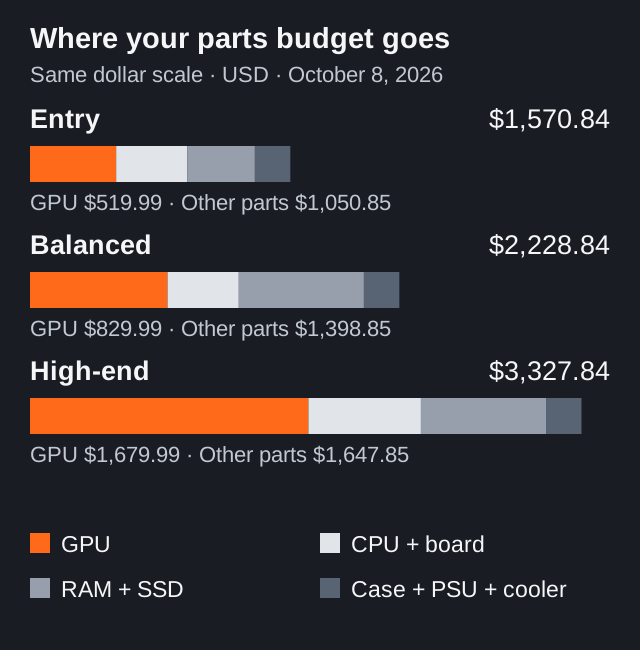
These lists illustrate a useful allocation principle: keep a sound foundation, then spend on the parts that address your goal. The Balanced and High-end builds use the same memory capacity and SSD capacity. High-end costs more because of its CPU and GPU, not because it comes with more RAM, storage, fans, or a fancier case.
Check fit and compatibility before checkout
- CPU, motherboard, and BIOS: Both CPUs use AM5. MSI lists Ryzen 9000 support for this B850 board. Check the CPU support list and required BIOS for the exact processor and board revision before ordering. Do not assume every AM5 board ships with the same BIOS. MSI specifications and support.
- Memory: These lists use DDR5 desktop UDIMMs and two-stick kits. DDR5-6000 is the kit’s rated profile speed, not a guaranteed automatic setting. Check MSI’s memory compatibility list; boot at default settings before enabling EXPO and verifying stability. Compatibility and profile speed depend on the CPU, memory configuration, and BIOS. MSI memory guidance, ASUS’s memory-profile explanation.
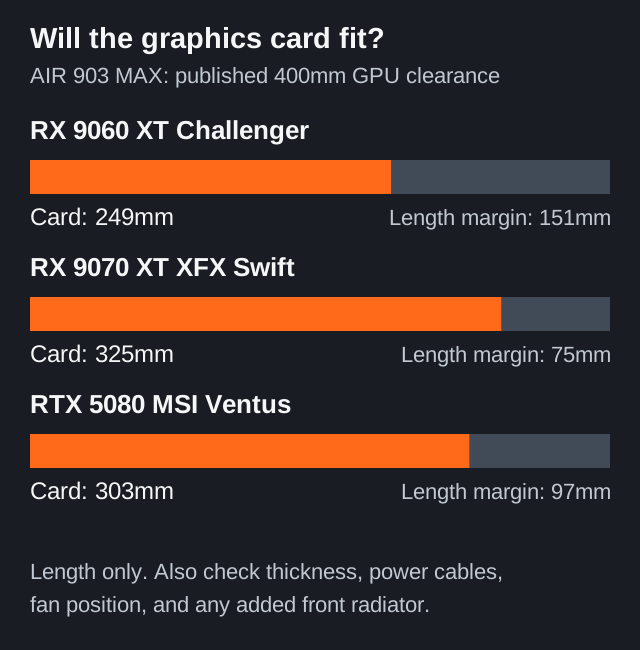
- Physical fit: The AIR 903 MAX lists 400mm GPU clearance and a 180mm CPU-cooler limit. The selected GPUs are 249mm, 325mm, and 303mm long, respectively. The Phantom Spirit 120 SE’s heatsink is 154mm tall; the final fan position may need adjustment around taller memory. Check the resulting installed height and side-panel clearance. MONTECH, Thermalright.
- Storage slot: The selected NV3 drives are M.2 2280 PCIe 4.0 models. Use a motherboard slot supporting that size and interface; consult the manual for slot sharing and heatsink restrictions. On this board, M2_1 is a straightforward starting choice for these drives. Kingston datasheet, MSI slot specifications.
- Power and cables: Match the exact GPU’s connector requirements. Use the cables supplied for your power supply and follow its installation guide; seat connections fully and route them without side-panel pressure. The PSU’s wattage does not by itself prove overall quality or compatibility. ASRock PSU guide, MSI GPU requirements.
Buy smarter in the U.S.
Compare the complete delivered basket. Look at Newegg, Best Buy, B&H, manufacturer stores, and Amazon, while checking who actually sells and ships each item. A marketplace listing and a retailer’s own inventory can have different return handling. Our table links are research references, not confirmations of GRC stock. In the main lists, the cooler is sold by THERMALRIGHT STORE and the Balanced GPU by XFX Official Store; both are shipped by Newegg. Other selected listings showed Newegg as seller and shipper when reviewed.
Check a local Micro Center if you have one. Its bundle page showed a $449.99 package with a Ryzen 5 7600X3D, Gigabyte B650 Gaming X AX V2 motherboard, and 16GB G.Skill Flare X5 memory. That replaces all three corresponding parts in the Entry basket; do not add it on top. Holding the other five listed parts constant gives a conditional parts subtotal of $1,340.85. This is an alternative for shoppers who can get that exact bundle locally, subject to the store’s availability and purchase terms—not a nationwide shipped offer. Recheck the bundle’s board BIOS and memory before buying. Micro Center bundle page.
Keep the full setup in your budget. Add sales tax for your checkout address, any shipping charge, an operating-system license if needed, and the monitor and peripherals you still need. Compare a prebuilt using the same CPU, GPU, RAM, storage, OS, and warranty information. A DIY parts subtotal and a ready-to-use system price are different scopes.
Skip upgrades without a purpose. The AIR 903 MAX already includes four 140mm fans. An additional fan pack, a display-equipped liquid cooler, or a premium motherboard should earn its place through a requirement you can name. The first two builds do not need the High-end CPU merely to be complete. Included case fans.
Your next move
Start with your monitor, check results for the games you actually play, then choose the least expensive list that meets your needs. Reprice the exact parts together before checking out. If you change the graphics card, motherboard, memory kit, or case, repeat the fit and power checks. A balanced build is the one that serves your setup without spending money on upgrades you will not use.